This post was written in partnership with Quidco to promote their new member bonus which is valid until 30th June 2024. If you join Quidco using this link, as well as being eligible for the free £15 Quidco sign up offer, I will make a small commission. Find out more here.
If you’ve seen my previous posts about Quidco Cashback, you may be aware of the free Quidco Browser Extension for Google Chrome, Microsoft Edge and Safari for iPhone and iPad users, which mean you never miss out on your Quidco cashback.
In this post, I’ve gone into detail about the Quidco Browser Extension (specifically the Quidco Google Chrome Extension, as that’s the version I have), exploring its features, benefits, and whether it is worth downloading.
Understanding the Quidco Browser Extension for Google Chrome

What is Quidco?
Before delving into the pros and cons of the Quidco Browser extension, it’s reasonable to ask – what is Quidco?
If you’re full of questions, your best bet is to refer to this post which introduces Quidco Cashback, or this blog post which tells you how to qualify for a free £15 new member bonus. If you’re still not convinced by the concept, this post gives you ten reasons to sign up to Quidco.
In summary though, Quidco is a platform which rewards users for making purchases through their affiliate links. Users sign up for a Quidco account, shop through the provided links, and earn cashback on qualifying purchases which is paid into their nominated bank account, or cashed out as vouchers.
The Quidco Browser Extension concept
The Quidco Browser Extension is designed to streamline the Quidco cashback process by automatically notifying users of potential cashback opportunities when they visit one of over 5000 participating online retailers. It makes it easy to remember your cashback, leading to increased money in your pocket.
How Does the Quidco Browser Extension Work?
Installation and Setup of the Quidco Chrome Extension
Getting started with the Quidco Browser Extension is a breeze. Users can find and download the extension on the Quidco website under ‘Cashback reminder’, or it can be downloaded directly from the Chrome Web Store. Once downloaded, click ‘install’ and the browser extension will be installed. Close and open a new Chrome browser and you’ll notice that there will be an extra ‘Q’ icon on your browser extension bar.
Once installed, it seamlessly integrates into the browser, ready to assist users in their quest for savings.
Automatic Cashback Activation
Once installed, the extension operates in the background, monitoring your online activity. When you visit a Quidco partner retailer’s website, the extension detects the opportunity for cashback and notifies the user to activate the cashback offer with a pop-up.
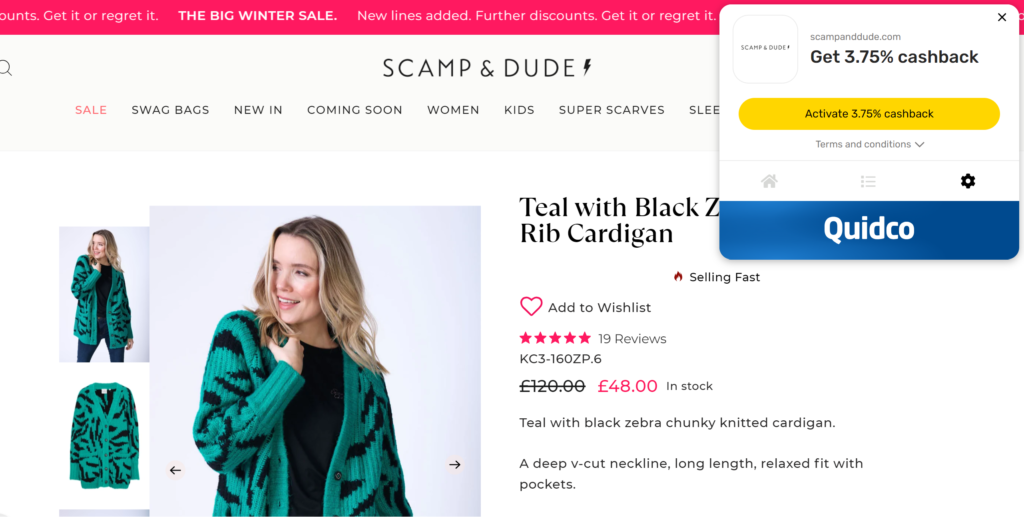
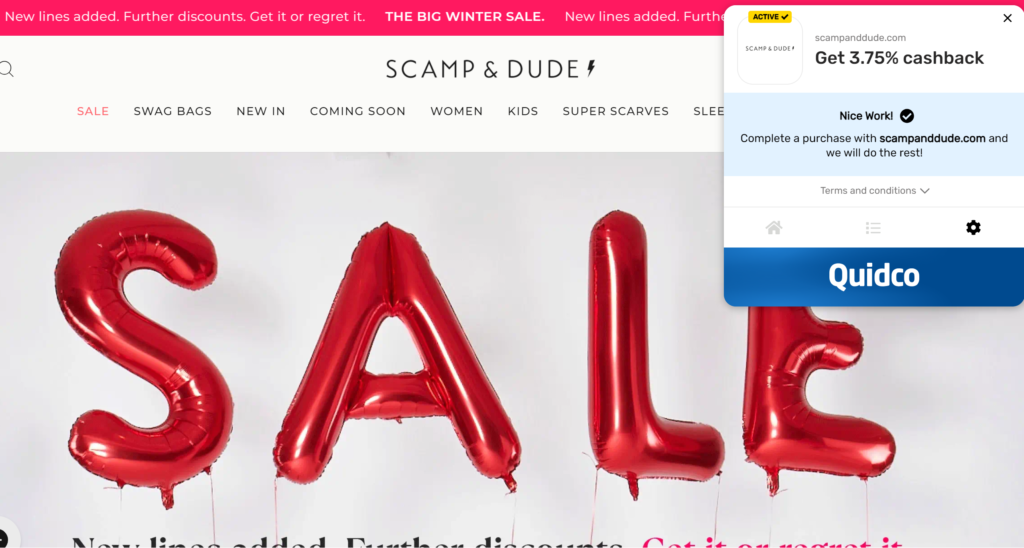
Click the button on the pop up and you will see the page below while you are redirected to the partner website.

Once the website re-opens, the Quidco Chrome Extension will track your purchases and you will be eligible for cashback.
Notification System
The Quidco Browser Extension boasts a robust notification system. Users receive instant alerts regarding available cashback offers, ensuring they never miss a chance to earn rewards on their purchases.
Tracking and Crediting Cashback
The extension acts as a reliable tracking tool, recording users’ transactions from start to finish. After a purchase is made through the affiliated link, Quidco tracks the transaction and credits the corresponding cashback to the user’s Quidco account. Once you’ve clicked through as above, the rest of the process is typically seamless, requiring little to no manual intervention on your part.
Google Highlights
You can choose whether to have Quidco highlight available offers when you use Google Search, which is really handy!

Is the Quidco Browser Extension good?
You know what it does but is the Quidco Browser Extension worth downloading?
I thought this would be best done in the form of a pros and cons list, so you can decide for yourself!
Pros
- It’s free: A basic Quidco membership is free (premium membership costs £1 per month when active) and the extension is free to download and use.
- It’s unobtrusive: Once you’ve downloaded and installed the Quidco browser extension, the only noticeable difference is the small Quidco icon in the top right hand corner above your bookmarks bar. If you’re on non-retail websites or websites which aren’t members then there are no pop ups and you won’t notice it at all; it only pops up when it detects that you’re on a relevant partner site.
- Never forget your cashback: This is of course the big pro: You’ll save more money. We all make purchases now and then without thinking about cashback and there’s nothing you can do once you’ve made the purchase. With the Quidco browser extension, any time you shop on Chrome (or your chosen browser) you’ll be reminded whenever cashback is available, so you can’t forget it!
- It requires very little effort: The Quidco Browser Extension all but automates the cashback process, eliminating the need for users to manually navigate through the Quidco platform before making a purchase. You just have to click once (and sometimes, in my experience, refresh the new page).
- You can shop like you usually would: You can use Google shopping or visit your favourite websites without first having to go through the Quidco website, meaning you can shop as you usually would with no additional effort, unfamiliar websites or spending money on things you don’t need just because there is cashback available. You can even see offers highlighted on your Google search if you so choose.
- Quick notifications: The extension’s pop up notification system ensures users are promptly informed about available cashback opportunities, maximising their chances of earning.
Cons
- Limited browser compatibility: As of now, the Quidco Browser Extension is specifically tailored for Google Chrome, Microsoft Edge and Safari users with an iPad or iPhone. Users of other browsers or android phones don’t currently have access to this convenient tool, so if you often use your mobile for purchases and you’re not an Apple user, you still have to remember to log in to Quidco in order to get your cashback.
- Members have to re-log in: Cashback is not automatic; you must visit Quidco site and click a button to ensure you receive cashback. Some users report being logged out and having to re-log in to the site, adding an extra step in there.
- Privacy concerns: Some users may be hesitant to install browser extensions due to privacy concerns. While Quidco emphasises its commitment to user privacy, individuals should carefully review the extension’s permissions and terms before installation – I can’t personally tell you what is and isn’t monitored by the extension, and whilst I’m happy to keep using the extension and believe that the benefits of cashback are worth the ‘intrusion’, others may feel differently.
How I’ve used the Quidco Browser Extension
As someone who most commonly uses Quidco for cashback on utilities etc, since downloading the Quidco Chrome Extension, I’ve managed to get cashback on online retail purchases that I would almost certainly have forgotten about otherwise. It’s not loads of money, but it all adds up and has taken no effort on my part at all.

Where can I download the Quidco Brower Extension to remind me of cashback?
Navigate to the Quidco website and ‘Cashback Reminder’ on the menu, which gives you links to the download pages.

On iPhone or iPad, go to the App Store and search for Quidco.